
Imagine this: one day it’s early morning, and you check your phone notifications.
Most of them are harmless, a few messages, some emails, maybe an app update.
However, one of them makes you shiver.
“Your account had a suspicious login detected.”
Your heart beats faster. “Wait, did I log in from another device?” you ask yourself.
You didn’t. Someone else made an attempt, and they might have been successful if you did not have 2FA enabled.
That one instance shows why millions of people worldwide now depend on Authy, Twilio’s straightforward yet effective two-factor authentication service that stealthily prevents hackers from accessing your online life.
Let us examine why Authy is regarded as the top mobile 2FA app of 2025, how it safeguards you, and why even tech experts entrust their most important accounts to it.
Passwords Are Not Enough in This World
The guardians of our online world were once passwords.
However, they are insufficient in 2025.
Your password might already be in a hacker’s database someplace due to data leaks, phishing scams, and AI-generated hacking tools.
Therefore, two-factor authentication (2FA) has become an essential security tool.
Your phone’s authenticator app generates a unique six-digit code that changes every 30 seconds, so nothing will happen even if someone knows your password.
The lack of that code locks them out.
And Authy excels in that very area.
The Authy Difference: Beyond Just Data
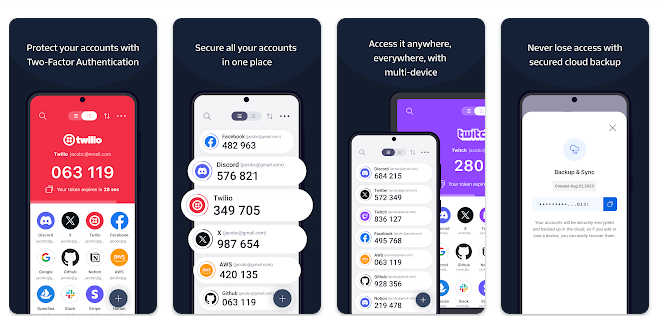
Authy appears straightforward at first glance: a collection of 6-digit codes and a list of accounts.
Behind that simple look, however, are some of the most cutting-edge cloud architecture and encryption currently on the market.
Let us see what makes it unique.
1. Your Safety Net: Encrypted Cloud Backups
Consider losing your phone that contains all of your 2FA codes.
You can lose access to your social media accounts, email, cryptocurrency wallets, and anything else if you are utilizing simple authenticator software.
Authy made that nightmare go away.
Each code you create with Authy is locally encrypted. Your 2FA data is then securely stored in the cloud, ensuring that it will not be lost in the event that your phone breaks or disappears.
Reinstalling Authy, confirming your identity, and entering your backup password will restore your codes.
Your phone does not negate your security.
2. Multi-Device Independence
Authy is not limited to a single gadget.
All of your codes will safely sync over Twilio’s secured network, and you can install it on your PC, tablet, or phone.
Those who manage several accounts or devices will find this very helpful.
For instance, as a digital marketer, you have login credentials for Google Ads, Instagram, TikTok, and other cryptocurrency platforms.
You may launch Authy on your laptop and securely log in if your phone is charging in a different room.
And if you ever choose to restrict it to just one device?
Simply turn off “multi-device” in the preferences. You maintain control.
3. Power Offline
Not a signal? No issue.
The internet is not necessary for Authy to function.
Because each code is created locally on your device using a time-based method, your protection is maintained even if you are in a remote location, on an airplane, or your Wi-Fi is down.
Because of this, it is more dependable than SMS-based authentication, which SIM-swappers might delay, intercept, or even block.
Your connection has no bearing on your safety.
4. Authentic Simplicity
It feels shockingly tidy when you first launch Authy.
Just your accounts, arranged with labels and logos, without any extraneous details or perplexing options. It only takes a few seconds to add a new account:
Go to the security settings on your website and scan the QR code.
With an icon and a time-based countdown indicator that indicates when the code will refresh, each account has its own slot. It is lovely in its simplicity and ideal for both novices and experts. Authy demonstrates that security need not be frightening.
5. Biometric Lock and PIN
Is your phone borrowed or lost? Do not panic.
Authenticators need biometric or PIN protection as an additional layer of security.
This implies that without your fingerprint, face, or passcode, someone cannot access your Authenticator app, even if they physically open your phone.
It is like a double-locked, guarded vault.
6. Available Nearly Anywhere
Authy is compatible with Google, Facebook, Binance, Bybit, PayPal, and Instagram.
It is compatible with almost all platforms that enable 2FA because it uses the common TOTP (Time-based One-Time Password) technology.
You can defend:
- Email addresses
- Social media (Instagram, X, TikTok …)
- Apps for trade and banking
- Exchanges for cryptocurrency
- Cloud storage and password managers
- Indeed, it is a universal key.
How to Quickly Set It Up
It only takes five minutes to set up Authy.
Step 1: Download the application from the App Store or Google Play.
Step 2: Provide your phone number and confirm by phone or SMS.
Step 3: Encrypt your data by creating a strong backup password.
Step 4: Open any online account → Select Security → Turn on 2FA → Use Authy to scan the QR code.
Step 5: Completed! Your account will show up with a six-digit code that rotates.
You will now enter your Authy code after your password each time you log in.
Easy. Strong and safe.
Why and Who Uses Authy
It is not simply techies who use Authy. It is for everyone who appreciates mental tranquility.
Entrepreneurs and Independent Contractors
Authy’s cloud sync and simple recovery are ideal for people that handle several logins, such as email, PayPal, hosting, and advertising.
Cryptocurrency traders
Losing a 2FA code in cryptocurrency could result in permanent financial loss. They can be sure that their valuables are protected even if their phone malfunctions thanks to Authy’s encrypted backup.

Regular Users
Authy offers enterprise-level security with user-friendly simplicity if all you want to do is safeguard your Google account or social media accounts.
The Reasons It Outperforms Other Authenticators
Let us do a short comparison:
Why It Beats Other Authenticators
Let’s compare quickly:
| Feature | Authy | Google Authenticator | Microsoft Authenticator |
|---|---|---|---|
| Cloud Backup | Encrypted | Limited | Yes |
| Multi-Device | Yes | No | Yes |
| Offline Use | Yes | Yes | Yes |
| PIN / Face Lock | Yes | No | Yes |
| Setup Simplicity | ⭐⭐⭐⭐⭐ | ⭐⭐⭐⭐ | ⭐⭐⭐ |
| Recovery | Fast & Secure | Manual | Good |
Authy strikes the ideal balance:
Not as complicated as Microsoft Authenticator
safer (due to encrypted backups) than Google Authenticator
Faster and lighter than both
It is the “Goldilocks” of security apps—perfectly balanced.
The Only Minor Negatives
Since no app is flawless, Authy should bear the following points in mind:
To register, you must have a phone number. Some people who care about their privacy favor programs that avoid that.
You cannot recover your encrypted data if you forget your backup password. This is a fantastic security feature, but it might be inconvenient if you are not careful.
That is all. These are small details for the majority of consumers.
The Prospects for Authy
Authy continues to change. Twilio is experimenting with enhanced encryption upgrades, passwordless logins, and biometric-based verification.
Their objective? To make signing in easier and safer—no waiting, no typing, just immediate trust between your device and you.
Authy’s ecosystem continues to grow as more services and apps embrace more robust authentication standards, solidifying its position as the foundation of safe online living.
when we finalize it
The silent hero we all need in a digital world full of passwords, frauds, and data breaches is Authy.
It does not boast.
It does not spam.
It merely acts as a barrier between you and any hacker attempting to gain access.
With encrypted backups, multi-device sync, offline protection, and a user-friendly interface, it has earned its title as the best 2FA authenticator app for mobile in 2025.
Whether you’re a crypto investor, business owner, or just someone who loves your privacy, Authy turns your phone into a personal security guard.