
A Practical Guide You Can Use
Smart glasses are finally moving from novelty to useful daily tools. In the last few years displays became brighter, batteries lasted longer, microphones got better at blocking noise, and software learned to recognize context in the real world. That progress means you no longer need to be an early adopter to get value. You can use these devices to navigate unfamiliar places, translate signs, capture hands-free photos and notes, or follow step-by-step instructions while your hands are busy. This guide explains what XR is, how smart glasses work, where they make sense, which specs matter, how to stay private, and what is coming next so you can make smart decisions without wasting money.
What XR Really Means
XR stands for extended reality. It is an umbrella term that covers three modes.
AR is augmented reality and overlays digital information on top of the real world.
VR is virtual reality and places you inside a fully digital environment.
MR is mixed reality and allows digital objects to interact with the real world in more advanced ways, like sticking a virtual note to your refrigerator so it appears in the right spot when you look at it again.
People often ask whether XR is only for headsets. It is not. Phones and tablets can deliver basic AR through their cameras, but glasses free your hands and keep information in your line of sight. That difference is important in day-to-day tasks. Phones are fine for a quick measurement or to see how a new couch might look in your living room. Glasses shine when you need constant guidance while you move, fix, cook, assemble, or teach.
Another common confusion is AR vs MR. You can treat MR as AR with extra awareness of surfaces, lighting, and depth. If the system understands that a table is a table, it can place a virtual manual on that table and keep it there while you walk around. The line between AR and MR is getting blurry as sensors and software improve, so you should focus less on labels and more on what the device can do.
How Smart Glasses Work
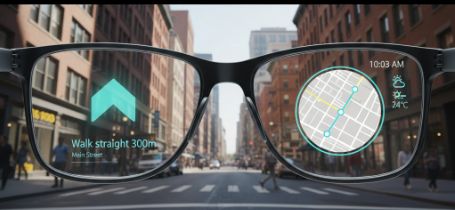
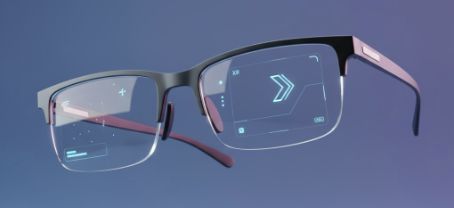
Modern smart glasses combine several parts that must work together smoothly. The display puts pixels into your vision without blocking your view. Most products use waveguides, which are thin transparent layers that route light from a tiny projector near the temple into your field of view. Some use micro LED for bright images that remain visible outdoors. Brightness is measured in nits. The more nits, the easier it is to see under sunlight. For indoor work lower brightness is fine, but outdoor navigation and cycling overlays need more.
Cameras help with two jobs. They can capture photos or video from a first-person view. They can also scan the environment so the software understands where to place graphics. Some models split these roles into a main camera and a lower resolution depth sensor. If you care about hands-free documentation, look at resolution, stabilization, and whether the lens shows a clear recording indicator. If you care about accurate overlays, look at tracking stability and how well the view holds its position when you move.
Microphones and speakers handle voice control and calls. The best devices use beamforming microphones that pick up your voice while suppressing wind and traffic. Speakers are often open-ear so you can stay aware of your surroundings. For privacy in public areas, bone-conduction speakers leak less sound, though audio quality is often thinner. If you take many calls, test audio in a noisy place before you commit.
Battery life depends on display brightness, camera use, and processing. Some glasses keep heavy processing on your phone or a pocket compute puck, which extends runtime and keeps frames lighter. Others put more power into the frame, which can make them heavier. Swappable or clip-on batteries solve the weight problem for some users. Think about your longest continuous task. If you need two hours of guided work, make sure your choice handles that duration without dimming or overheating.
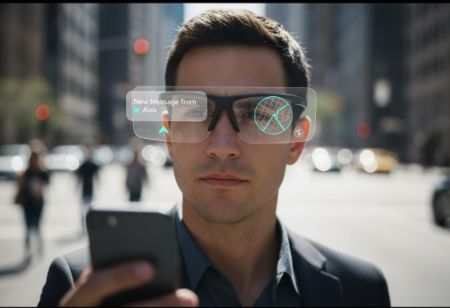
Connectivity is usually Bluetooth plus Wi-Fi. Pairing with your phone gives you notifications, hotspot data, and access to the phone’s AI features. Wi-Fi enables faster cloud sync and high quality video uploads. Some glasses support simple touch gestures on the temple or a small ring remote for precise controls.
Where Smart Glasses Are Useful Today
Navigation and travel are the most obvious uses. Instead of glancing down at a phone, you see arrows at the end of the hallway or at the next street. The best systems pin markers to places so they do not float away when you turn your head. This helps in airports, stadiums, shopping malls, and city walking where quick decisions matter.
Field work is another strong fit. If you service equipment, you can follow a visual checklist while your hands stay on the tools. If you are new to a task, step-by-step overlays reduce mistakes and stress. In training, instructors can capture what they see and share it with new hires later. In inspections, a see-what-I-see call saves travel and speeds up sign-off. Compared to a phone clipped to a chest harness, glasses give you a natural view and less weight imbalance.
Creators like the first-person angle for cooking, crafts, and outdoor activities. A head-height camera captures what you see without setting up tripods. You can film a bike route, a surf session, or a how-to video without juggling gear. Stabilization is critical here. Look for horizon leveling and low light performance if you film at dawn or dusk.
Students and knowledge workers use glasses for focus cues rather than for full apps. A subtle timer in one corner helps with the Pomodoro technique. A floating outline or formula near the top of your view reduces tab switching. Real time translation of signs, slides, or handwriting can speed up note-taking. In a meeting, you might pin your agenda to a wall behind the camera so it stays in sight without blocking faces.
Accessibility is a growing area. For people who benefit from live transcription, captions in view make conversations easier. For people who benefit from visual prompts, a gentle nudge to stand, drink water, or blink more often reduces strain. The point is not to replace phones but to give timely, low friction prompts that fit daily routines.
Buying Guide and Key Specs That Matter
Comfort first. If the frame hurts your nose after fifteen minutes, you will not wear it for two hours. Weight distribution matters more than raw grams. Try moving your head up, down, and side to side. If the lenses shift or the temple presses too hard, look for different nose pads or a better balance.
Display quality next. Check brightness outdoors, focus clarity at the edges, and color accuracy. Some waveguide designs introduce rainbow artifacts or reduce contrast against bright backgrounds. If you plan to read small text in sunlight, you need higher brightness and good anti-reflective coatings. If you are mainly indoors, prioritize sharpness and comfortable white balance.
Field of view affects how much information you can see at once. A small field of view is fine for subtle prompts, navigation arrows, and captions. Large field of view is better for complex workflows but can add weight and reduce brightness. Decide based on your top use case. Bigger is not always better if you want a lightweight device for errands.
Battery life should match your longest continuous session. If you need to record an hour of video, test at the brightness and resolution you plan to use. Some devices dim the display to protect heat. Make sure the device still performs well after twenty minutes of continuous use. Look for quick charge options that add meaningful time in ten to fifteen minutes.
Cameras deserve special attention. If your work involves people, make sure there is a clear recording indicator. It helps with etiquette and avoids misunderstandings. Check stabilization by walking, turning, and climbing stairs. If footage makes you queasy, it will not be fun to edit. For still photos, look at shutter lag and how well the device handles indoor lighting without blur.
Controls shape how you use the device. Voice is convenient, but you need a fallback in noisy places. Tap and swipe gestures on the temple are common. A small ring or wrist remote is helpful in winter when gloves make touch unreliable. Assign one long press to mute the microphone instantly so you can pause voice listening in sensitive spaces.
Compatibility and apps round out the buying list. Make sure the glasses work well with your phone, your calendar, your maps provider, and your favorite cloud drive. If your team uses a specific platform for remote support or checklists, confirm there is a native app or a browser mode that behaves like one. Check whether the software updates regularly and whether you can export your data without lock-in.
Privacy and Safety
Wearable cameras demand careful habits. Treat recording as opt-in. Use the recording indicator at all times. If your device allows it, keep a subtle, visible light that cannot be disabled when the camera is active. Announce before you start recording in meetings or private spaces. In schools, hospitals, and offices, recording may be restricted or banned. Follow posted rules and ask first.
For data privacy, prefer on-device processing for sensitive tasks. Voice transcripts, face blurs, and object labels can often run locally. When you must use cloud features, check retention settings. Turn off automatic cloud uploads if you do not need them. Use profiles to separate work content from personal content, and add a passcode or biometric lock to the companion app on your phone.
For location safety, be careful with public overlays that display home or work addresses. Use generic names for saved places. If you share a route, review the clip before posting to remove identifying details. If your glasses can detect nearby people to help with composition or focus, disable face recognition features that are not necessary for your tasks.
For bystander safety, avoid wearing camera-equipped glasses in places where cameras are not expected, such as bathrooms, locker rooms, and some gyms. Use audio through open-ear speakers at low volume so you can hear traffic. If your device has a passthrough mode that brightens the real world during overlays, enable it when you walk near streets.
Setup Tips and Everyday Habits
Start with one or two high value workflows. Add navigation prompts for walking commutes, or add a simple timer and a floating outline for study blocks. Keep it small for the first week to learn the controls and battery habits. Once you know what feels comfortable, layer in more features.
Tune brightness and color early. Many users leave brightness too high, which reduces battery life and can cause eye fatigue. Choose a warm white balance for night use and a neutral tone for daytime. If your device offers comfort modes, use them. They slightly reduce contrast to make long sessions easier.
Customize gestures to match how you think. Put your most common command on a double tap. If you often mute the mic, assign a long press. If you often need a photo, assign a single tap. Reduce accidental triggers by lowering sensitivity in the companion app.
Organize overlays with a few anchor points. Pin your calendar to the top left, to-do list to the top right, and the timer near the bottom. Keep the center free so you can see faces and the sidewalk. Avoid clutter. Overlays should appear when needed and then fade out.
Maintain your device like a pair of glasses, not like a phone. Clean lenses with microfiber cloths, not shirts. Keep batteries between twenty and eighty percent when stored. Update software during downtime so you are not forced to update before a task. If your model supports modular nose pads or temples, keep spares.
What Comes Next for XR
The near future of smart glasses focuses on comfort, clarity, and context. Comfort will improve with lighter frames, better heat management, and prescription-friendly designs. Clarity will improve with brighter microLED engines, better color filters, and sharper waveguides that keep text crisp to the edges. Context will improve as on-device models recognize spaces and tasks without sending data to the cloud.
Expect tighter phone integration. Your glasses will act like a head-up extension of your device rather than a separate platform. Expect better multimodal input so you can mix voice, glance, and subtle hand poses. Expect more situational awareness, like automatic do-not-disturb when you cross a street, and auto captions that appear only when people speak.
Enterprise features will trickle down. Remote assistance, step tracking, and audit logs will become simple consumer features you can turn on for home projects. Education apps will offer shared spatial notes that stick to whiteboards and lab benches. Fitness apps will place coaches on your route so they feel present without blocking your view.
The main constraint remains battery life. Manufacturers will balance brighter displays with efficient processors and quick charge packs. Until batteries break through, the best strategy for users is to think in focused sessions. Use the device in twenty to forty minute blocks for tasks where it shines. Put it back in the case to rest and charge.
Frequently Asked Questions
Are smart glasses worth it for everyday users
They can be, if you choose a few tasks that benefit from quick, hands-free guidance. Navigation, first-person capture, captions, and small focus aids are the best starting points. If you want full apps floating around you all day, you will likely be happier with a larger headset at home and lighter glasses on the go.
Do I need a powerful phone to use smart glasses
You need a reliable phone more than a powerful one. Stable Bluetooth and Wi-Fi matter for smooth pairing and uploads. If your glasses offload processing to the phone, a recent midrange device is fine. If you plan to edit long videos, the phone’s storage and processor will matter.
What specs should I prioritize if I work outside
Brightness, stabilization, and battery life come first. Test legibility under direct sunlight and while walking. If you wear a hat or helmet, check whether the frame fits under it without shifting. Look for weather resistance and a case that slides into a small pocket.
How do I record people responsibly
Get consent when practical. Keep the recording indicator visible. Announce in meetings that you are recording notes. Avoid sensitive spaces and posted no-camera zones. Store recordings in a secure folder and delete clips you do not plan to use.
Will smart glasses replace my phone
Not in the short term. Glasses are better for glanceable guidance. Phones are better for heavy typing, long reading, and complex app use. The two work best as a pair. Over time the line may blur as input methods improve, but for now think of glasses as a useful extension.
Final Buying Checklist
Pick your top two use cases and write them down. Select a frame that fits your face and sits comfortably after fifteen minutes. Test brightness outdoors and clarity at the edges. Check camera indicators, stabilization, and audio in a noisy place. Confirm your longest session battery needs. Map your most used controls to simple taps and long presses. Review privacy settings, recording lights, and data retention. If the device passes these tests, it is a good match for your daily life.
Smart glasses work best when they solve plain problems. If they help you find your way faster, learn a new task with fewer mistakes, capture moments you would otherwise miss, or communicate more clearly, they are worth having. Start small, build habits, and let the technology fit your day rather than the other way around.